Report server overview
The BDTest report server is an ASP.NET Core app that stores your test reports and shows them in a browser. Test runs upload their results at the end of a run and get back a URL that you can share.
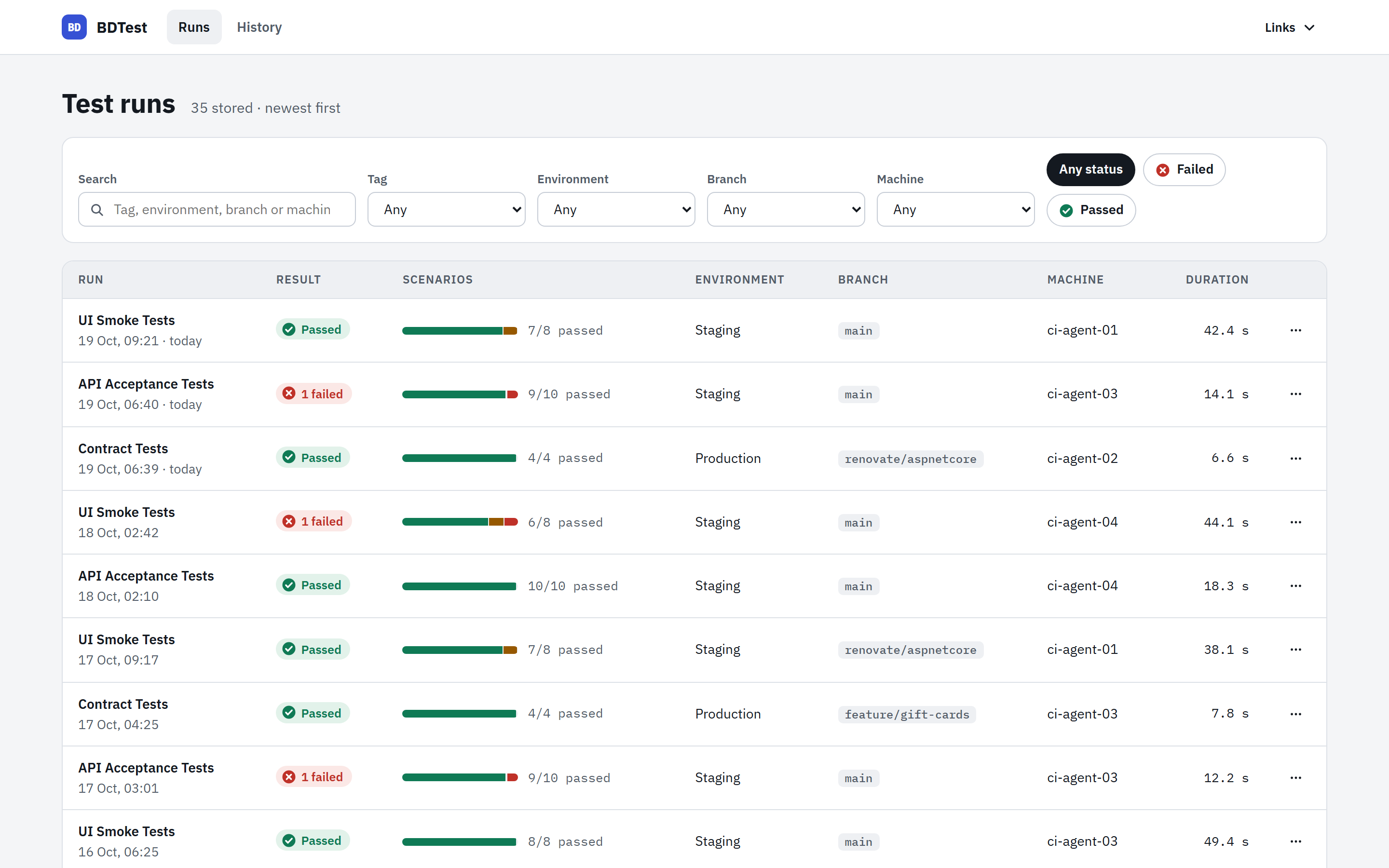
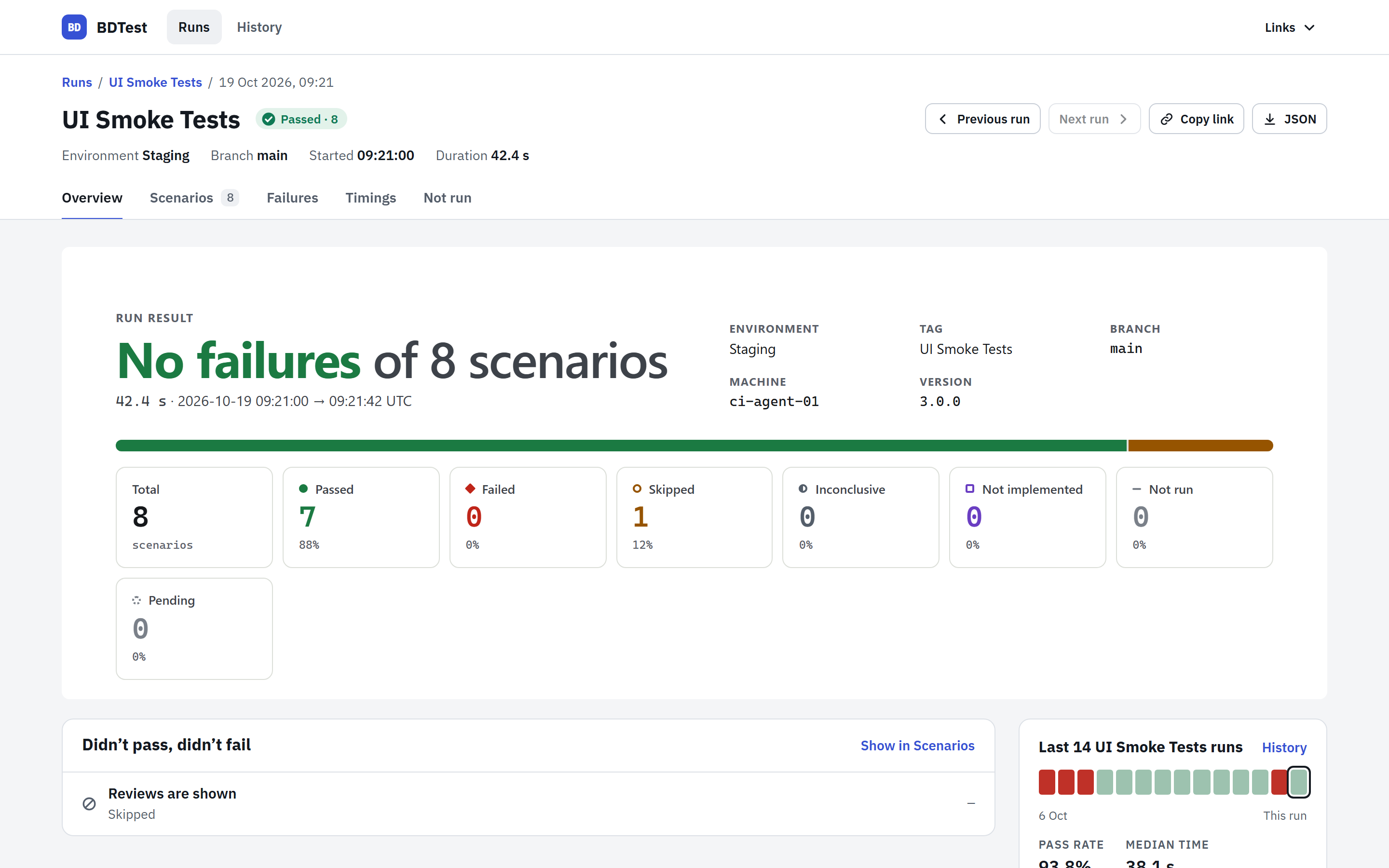
It gives you:
- a list of test runs, filterable by status, environment, tag, branch and machine,
- a page per run with tabs: Overview (the verdict, what needs attention and recent runs of the same tag), Scenarios (search, filter and group by story, with a detail panel), Failures (failed scenarios grouped by cause), Timings and Not run,
- a full page per scenario with its failure, steps, attempts and output,
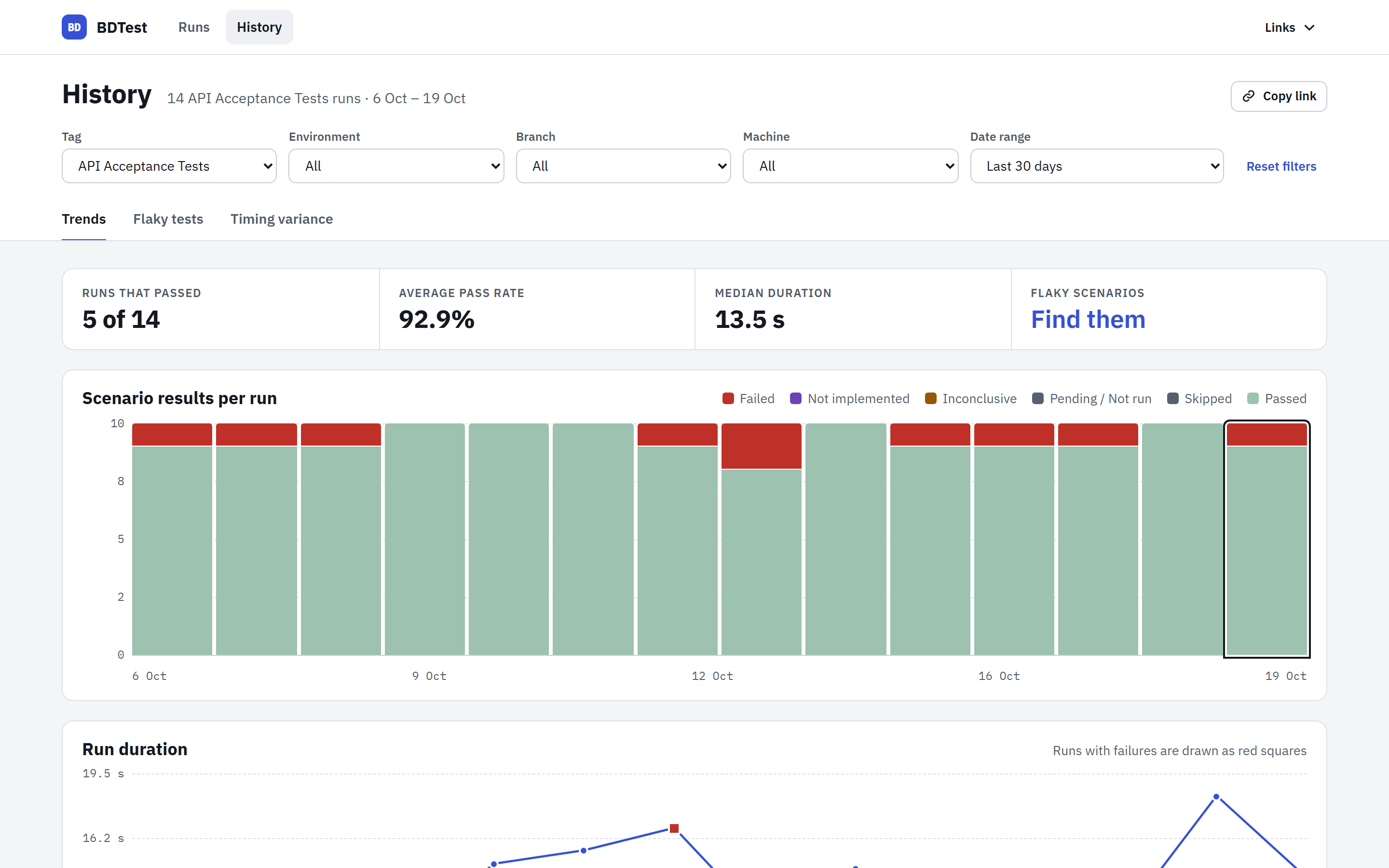
- a History section for the runs that match a tag, environment, branch, machine and date range: Trends (results and duration per run), Flaky tests (scenarios that both passed and failed) and Timing variance,
- links you can send to anyone with access. Pages follow the system light or dark theme and work on phones.
How it fits together
 test run (NUnit / xUnit / MSTest / TUnit)
   └─ BDTestReportUploader.UploadReportAsync(...)
         │  POST /bdtest/data   (X-BDTest-Upload-Key)
         ▼
 your ASP.NET Core app
   ├─ BDTest.Razor.Reports       controllers + views
   ├─ bounded in-memory cache    recent full reports
   └─ IReportStore + IRunIndexStore  optional persistent storage (Blob, SQL, files…)
BDTest.Razor.Reportsis a NuGet package with the controllers and Razor views. You add it to your own ASP.NET Core app. See Setup.- Storage is pluggable. Without a data store, reports live only in memory. See Persistence.
BDTest.ReportGenerator.RazorServerin the repository is a complete sample host that uses Azure Blob Storage and Microsoft Entra ID. It is not published as a package. See Sample server.
The report library's display title is BDTest - ASP.NET Core Reports. Install it
using the existing BDTest.Razor.Reports ID. Its namespaces and static asset paths
stay unchanged; BDTest.ReportGenerator.RazorServer remains a non-packable sample.
BDTest.Reports.Storage.FileSystem supplies directory-based report persistence.
See Persistence.
BDTest.Reports.Storage.AzureBlob supplies Azure Blob persistence.
Pages and endpoints
All routes are under /bdtest.
| Route | Page |
|---|---|
GET /bdtest/report/test-runs | Test run list. / redirects here. status=Passed lists runs with no failed, inconclusive, pending or unfinished scenarios; not implemented and skipped scenarios don't stop a run counting as passed. |
GET /bdtest/report/{id}/summary | Run Overview. /bdtest/report/{id} redirects here. |
GET /bdtest/report/{id}/all-scenarios | Scenarios, with search (q), status (filterByStatus, one status or a comma-separated list), tag (filterByTag), exact story text (story), ordering (order) and grouping by story. Story links on a scenario page select that story. scenarioId opens a scenario in the side panel. Shows 100 scenario rows per page (page). |
GET /bdtest/report/{id}/stories | The Scenarios page, grouped by story, with the selected ordering applied within each story. Kept for older links. |
GET /bdtest/report/{reportId}/scenario/{scenarioId} | One scenario. |
GET /bdtest/report/{id}/top-defects | Failures, grouped by exception and location, exception type or failing step. Stack traces can be expanded and collapsed. Also at /failures. |
GET /bdtest/report/{id}/timings | Timings: slowest and fastest scenarios. |
GET /bdtest/report/{id}/warnings | Not run: tests that were built but never ran. Also at /not-run. |
GET /bdtest/report/{id}/raw-json-data | The report as JSON. |
GET /bdtest/report/history | History Trends: results and duration per run. Also at /bdtest/report/trends. |
GET /bdtest/report/history/flaky | History Flaky tests, across the latest matching runs. Also at GET /bdtest/report/test-run-flakiness. |
GET /bdtest/report/history/timing | History Timing variance: per-scenario fastest, average and slowest passing times across the latest matching runs. |
GET /bdtest/report/test-run-times?reportIds=a,b | Timing variance for chosen runs. |
POST /bdtest/report/test-run-flakiness | Flaky tests for chosen runs (form field reportIds). |
DELETE /bdtest/reports/{id} | Delete a report. Returns 204, including when absent. Requires an admin and antiforgery token. |
POST /bdtest/data | Upload endpoint used by test runs. See Sending results. |
GET /bdtest/ping | Anonymous health and warm-up check. |
History pages read the filters tag, environment, branch, machine and range (7d, 30d, today, month or all; the default is 30d) from the query string, so you can share a filtered view. Links from a run open History with that run's tag, environment and branch. Flaky tests and Timing variance compare the latest 20 matching runs by default; set compare to choose between 2 and 50.
Trends includes unfinished scenarios (NotRun) in the results chart and the table's Other count. Declared tests that never became scenarios are excluded from both; inspect them on the run's Not run tab.